Timetable
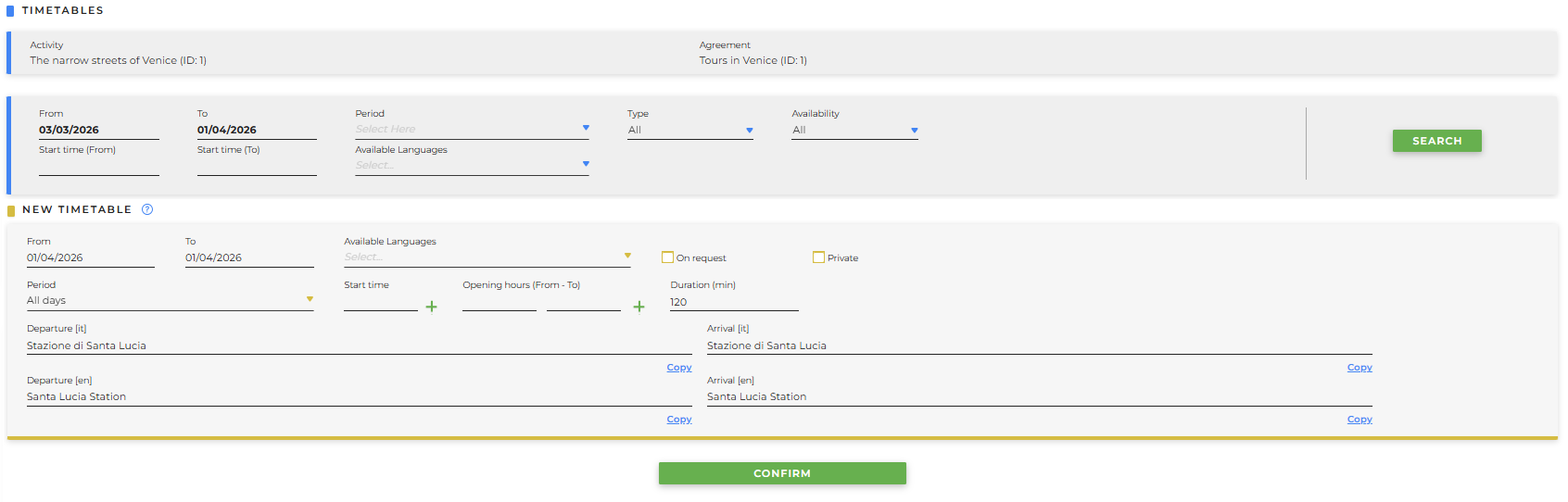
in questa sezione sarà possibile stabilire:
- From / To: time period during which the activity is available
- Available Languages: you can select which languages will be available for the activity
- On request: if checked, the activity is available on request for the entered dates
- Private: if checked, it is not required to fill in the times and days of the week when the tour is available; these must instead be arranged directly with the guide
- Period: you can select the days on which the activity is available
- Start time: you can indicate the start times of the activity; multiple times can be added by clicking +
- Opening hours (From - To): you can specify the opening and closing times
- Duration (min): you can indicate the duration of the activity in minutes
- Departure: starting point of the activity, which must be provided in all languages
- Arrival: endpoint at the end of the activity, which must be specified in all languages
by clicking Confirm, you will be able to see the result of the entry:

-
once the calendar is entered, it will be possible to determine whether it is valid or not:
- no line: a tariff is associated, so it is valid and correctly configured
-
red line on the left side of the calendar: no tariff is associated
NOTA: an activity cannot be displayed if a calendar and an associated rate are missing.
The following buttons will also be available:
-
Info: hovering the mouse over it will summarize all additional activity information that is not shown in the preview
-
Edit mode: allows you to modify the calendar
-
Trash bin: allows you to delete the created calendar, but only after clicking the edit mode icon
- Sow related tariff: allows you to view the tariffs linked to the calendar