Flights Booking Online
To make an availability request, go to Bookings Online > Flights
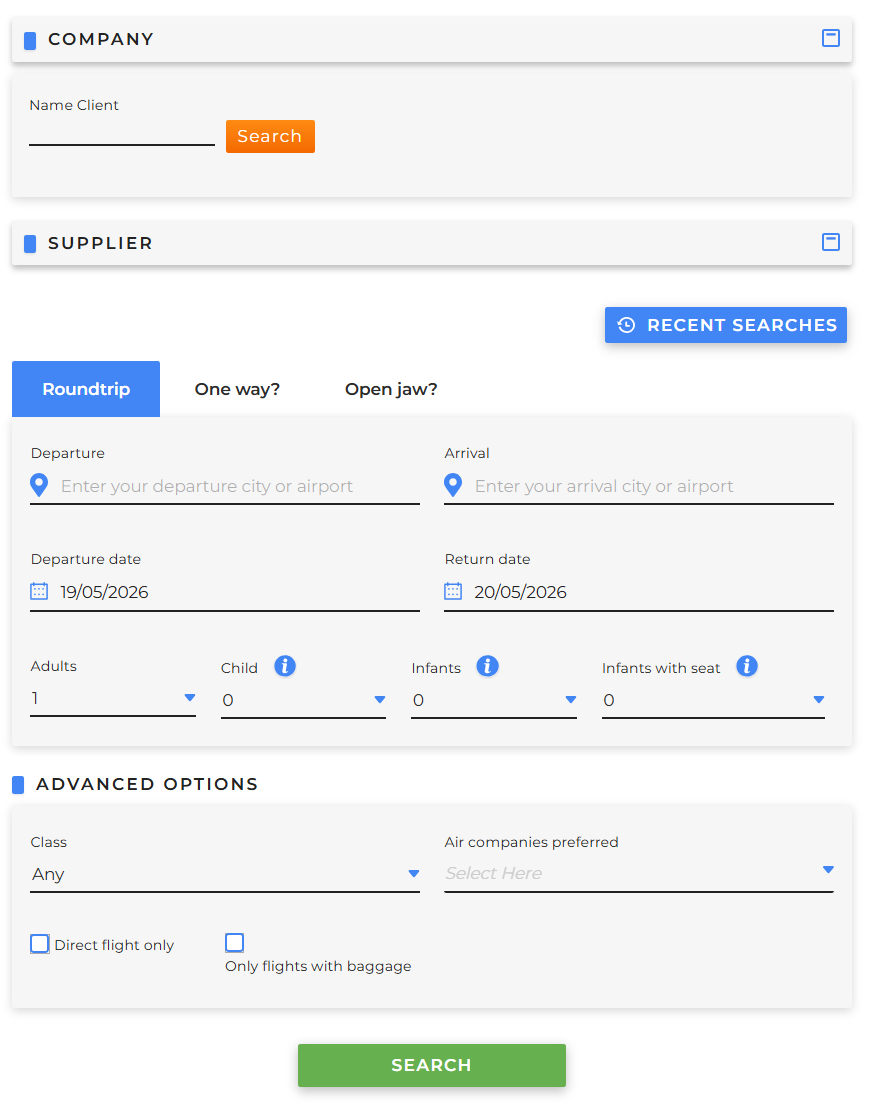
-
Company it is mandatory to set a customer for whom the search will be performed, specifying:
- Name Client
- Client
- User
-
Supplier
- Suppliers: Tour Operator can choose to view results from specific suppliers by selecting them from the drop-down menu
-
Recent searches: Tour Operator can view and relaunch availability searches made by the customer within the last 7 days
- Roundtrip: if the flight includes a Departure Date and a Return Date
- One way?: if the flight includes only a Departure Date
-
Open jaw?: if the flight includes up to five Departure Date, which can be added or removed using the dedicated buttons
- Departure: specify the departure city or airport (IATA codes are also accepted)
- Arrival: specify the arrival city or airport (IATA codes are also accepted)
- Adults: specify the number of adults
- Child: specify the number of children aged 2 to under 12 years at the time of travel
- Infants: specify the number of infants aged 0 to under 2 years at the time of travel
- Infants with seat: specify the number of infants aged 0 to under 2 years at the time of travel who require a seat
- Advanced options completing the following fields is optional
- Class: select the class from the drop-down menu
- Air companies preferred: select the airline(s) from the drop-down menu
- Direct flights only: select this option to search only for non-stop flights
- Only Flights with baggage: select this option to search only for flights that include baggage