Activity Service
An activity booking will be displayed with the corresponding icon placed at the beginning of the Service code:
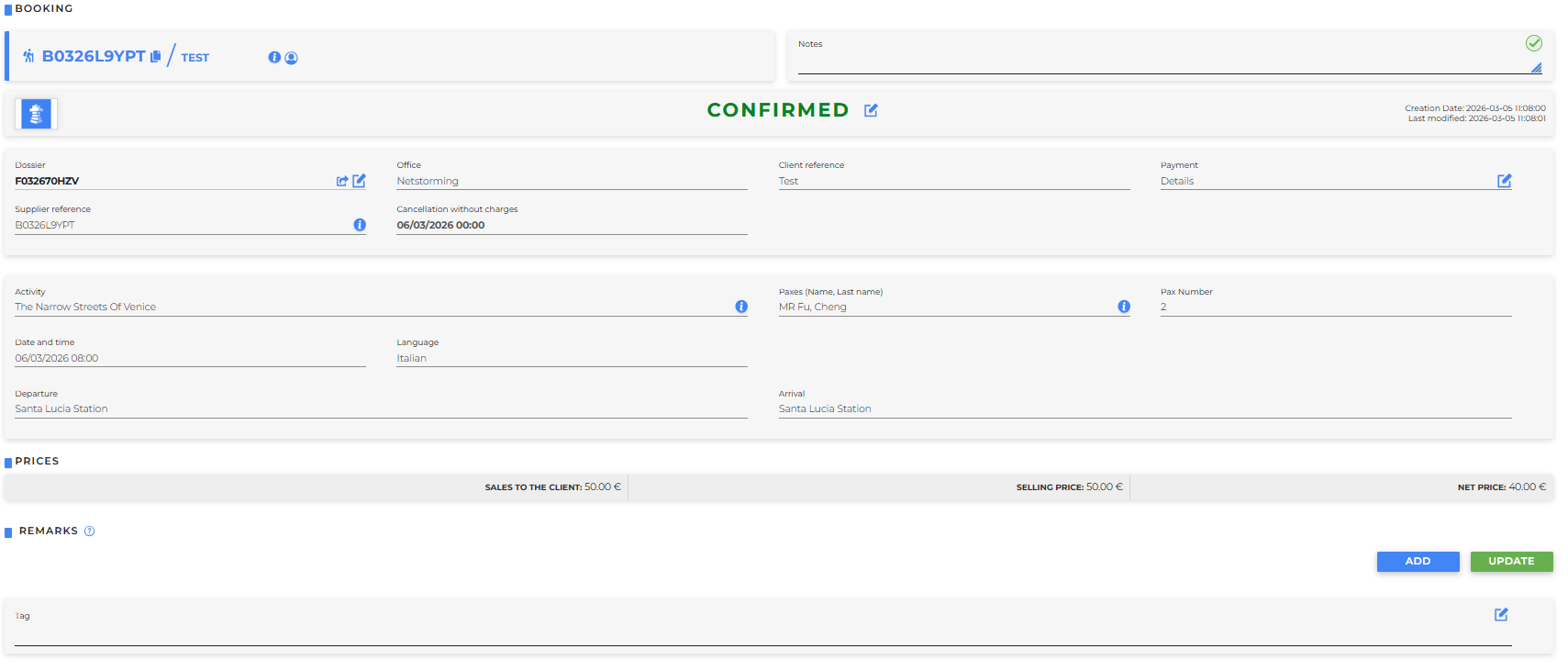
The following information will be displayed:
- Booking status
- Regarding the Service:
- Dossier
- Office: that made the booking
- Client reference
- Payment: it is possible to view details and modify
- Supplier reference
- Cancellation without charges
- Regarding the trip:
- Activity: name identifying the excursion; by hovering over the info icon, details will be displayed
- Paxes (Name, Last name): names of participants
- Pax number: number of participants
- Date and time: when the activity will take place
- Language: in which the activity will be conducted
- Departure: departure location
- Arrival: destination location
- Prices
- Sales to the client: price including any markup set in Markup (Activity) under the Customer Price Policies
- Selling price: gross price
- Net price: price without any markup
- Remarks: it is possible to add them even after booking
For each service, the following buttons are available:

- Update datas
- Change
- Cancel
- Credit card: allows viewing or managing the credit card associated with the booking
- Store
- Block notifications
- **Contract
- Logs
- Supplier notifications
- Client mail
- Add/Remove watcher
- Voucher
- Send document
- Back: allows returning to the previous screen